
The PDF editor people actually enjoy using
Merge, sort, split and rotate PDFs right in the browser — drag & drop, live previews, Google Drive import. No installs, no uploads. And it is now free for everyone.
Documents are merged, sorted and split in your browser. Nothing is uploaded — not with the app, not with the SDK.
1 · The product
A PDF tool that does the boring parts well
Drag & drop, previews, rotation, splitting, ZIPs and Google Workspace — the things people actually need when they work with PDFs.
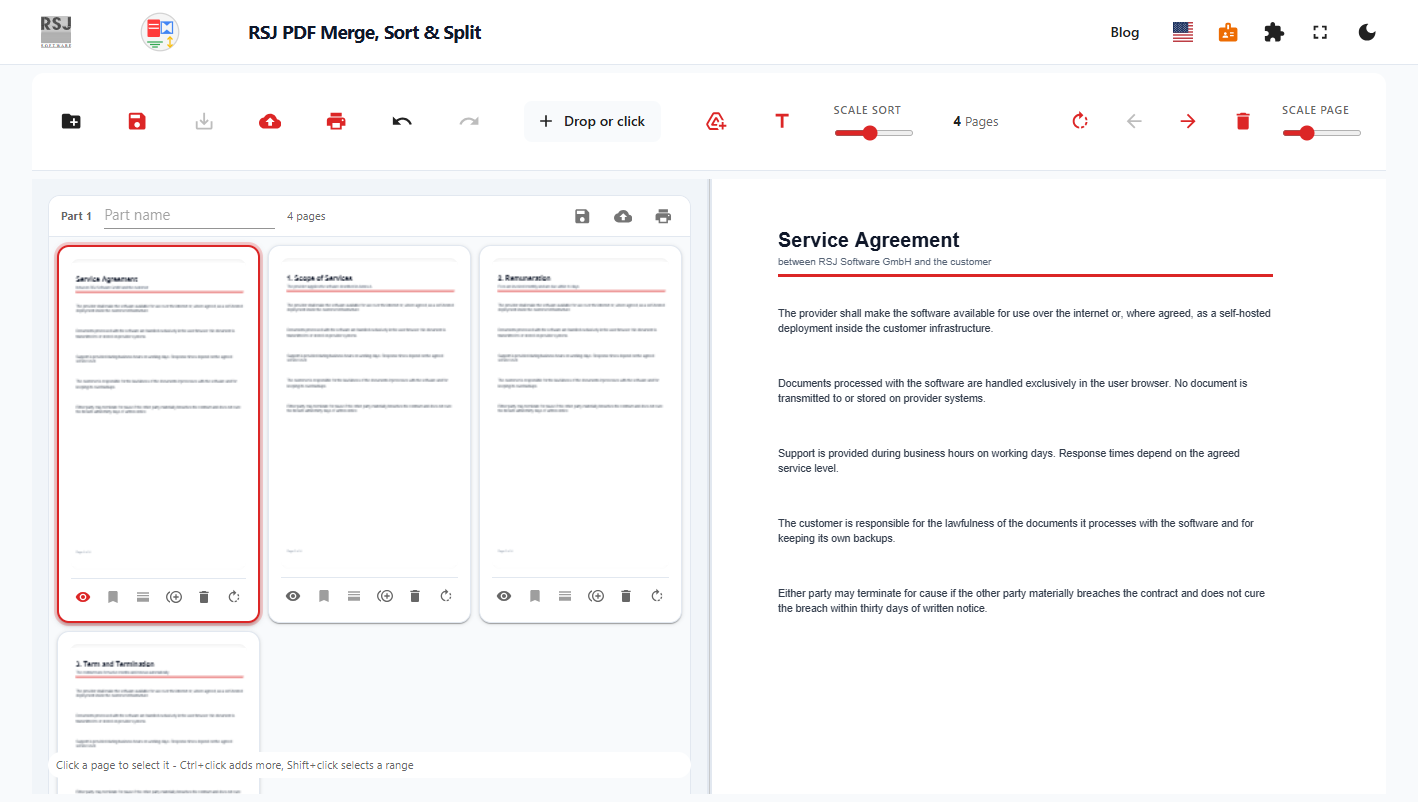
Drag & drop
Drop PDFs or a ZIP straight onto the page. The editor merges and re-parses them in place — no file dialog in the way.
Document preview
A live preview of the page being worked on, so the result is visible before anything is exported.
Page previews
Every page as a thumbnail. Users reorder pages, group them into parts, and select ranges with Ctrl and Shift.
Rotation
Rotate a single page or a whole selection. The rotation is baked into the exported document.
Page deletion
Delete single pages or a multi-selection. What is left on screen is exactly what gets exported.
ZIP import & export
Import a ZIP full of PDFs, then export one PDF per part — or every part together as a ZIP.
Google Workspace
Add PDFs straight from Google Drive. Docs, Sheets and Slides are exported to PDF on import.
Chrome extension
The same engine as a browser extension: send the PDF of the current tab to the editor with one click.
2 · Free for everyone
And now it is free. Really free.
The app used to be sold per licence. We removed that: no page limit, no licence key, no account, no watermark, no trial.
- ✓Unlimited pages and documents
- ✓No account, no email, no sign-up
- ✓No watermark, no trial, no upgrade nag
- ✓Works offline once the page has loaded
- ✓Documents never leave the browser
Before / after
100 pages per document → unlimited
Licence key required → none
Free edition branded → clean output
Trial period → open-ended
Same engine, same privacy: everything still runs in the visitor's browser.
3 · For products
Put the editor inside your own product
The free app is our best demo. If you build a web application that handles documents, embed the same engine — hosted by us, or running in your own infrastructure.
Hosted SDK
A small SDK that loads the editor in an iframe on your page. Your users work inside your product, without a redirect and without any PDF code in your bundle.
- ✓One iframe, a few kilobytes of glue
- ✓Load, export and action events
- ✓Works with any framework
Self-hosted
Run the same iframe on your own infrastructure. Same code, your network, your change control — including air-gapped setups.
- ✓Container image for your platform
- ✓No outbound calls, offline licence
- ✓Fits regulated industries
That is the whole business model: the app is free, and the teams that need the editor inside their own product licence the SDK. Giving the app away is not a loss leader — it is the demo.
Where it makes sense
Five places an embedded editor pays off
These are the situations where a PDF feature becomes a product advantage — and where licensing the SDK is cheaper than building and maintaining the tooling yourself.
Tools that create PDFs
Reports, tickets, statements, contracts — your product already produces the document. Embed the editor so users can reorder, merge, rotate or split the result before it leaves your app, instead of building PDF plumbing yourself.
Document scanning
A scanner or phone app produces page images. The editor turns them into a clean PDF: delete misfeeds, rotate crooked pages, drag them into the right order — the review step every scanning workflow needs.
Invoice and accounting workflows
Month-end means collecting invoices from mail, portals and drives, then handing one file to the accountant. Users merge, sort and trim them in the browser, inside the tool where the invoices already live.
Case files and dossiers
A case file bundles correspondence, filings, records and scans — often from several sources. Embed the editor where the case is managed, so the dossier is assembled, trimmed and reordered without a separate desktop tool.
Teams that live in Google Workspace
Docs, Sheets and Slides are exported to PDF on import, and PDFs come straight from Drive. No download, convert and re-upload loop for people who keep their work in Google.
Integration
Three steps to an embedded editor
The SDK is a thin wrapper around an iframe. Nothing of yours needs to be rewritten, and no PDF parsing code runs in your bundle.
Install the SDK
One package, no build tooling required — or plain HTML with a script tag.
Point it at the editor
The SDK creates the iframe and the postMessage handshake with the hosted app (or your own deployment).
React to the result
Your page receives the exported PDF (or ZIP) and any user action, and decides what happens next.
import {
  PDFMergeSortSplit,
  usePdfMergeSortSplit,
} from 'pdfmergesortsplit/react';

export function PdfEditor({ onExport }) {
  const { ref, exportDocument } = usePdfMergeSortSplit();

  return (
    <PDFMergeSortSplit
      ref={ref}
      config={{ embedUrl: 'https://pdfmerge.rsj.de' }}
      style={{ height: 640 }}
      onExport={(result) => onExport(result)}
    />
  );
}
Prefer plain HTML? See the embedding guide for the bare iframe and the message protocol.
Enterprise
Run the engine in your own infrastructure
For strict control, regulated industries and air-gapped networks, the same editor is available as a self-hosted deployment.
- ✓Container image that serves the iframe from your network
- ✓Offline licence — no call to an RSJ server, no telemetry
- ✓Pinned version, your change control, your patching cycle
- ✓Optionally embedded in your own SSO and audit environment
How it works
You deploy the editor image on an internal host. Your page embeds it exactly like the hosted SDK — the iframe just points at your own URL instead of ours.
config={{ embedUrl: "https://pdfmerge.your-domain.example" }}Because the editor runs entirely in the browser, your documents never leave the client even in this setup.
Pricing
Free for users, licensed for products
The app is free. Integration is a licence — priced by integration and volume, not by page.
Free app
€0
The browser app, for everyone
- ✓Unlimited pages
- ✓No account required
- ✓Documents stay in the browser
- ✓No watermark
SDK
On request
Embed the editor in your product
- ✓Hosted iframe + SDK
- ✓Load, export and action events
- ✓Per-integration licence
- ✓Support and version updates
Enterprise
On request
Self-hosted deployment
- ✓Runs in your infrastructure
- ✓Air-gapped and offline licence
- ✓Change control and version pinning
- ✓Deployment support
Prices depend on the integration and the volume. Tell us what you are building and we will send you a concrete offer.
FAQ
Questions we get asked
Start with the free app
Use it yourself first — then talk to us when you want the same editor inside your own product.